

CONNECTPlayer CMS
One Cloud CMS Platform from Single Displays to Video Walls
CONNECTPlayer CMS Features
Powerful tools to manage, create, and optimize digital signage at scale.
Integrated Device Management
From a single dashboard, monitor health, push updates, and control thousands of screens worldwide.
◉ Enterprise-Scale Control: Manage global screens at scale.
◉ Multi-Display Support: From single displays to video walls.
◉ Live Health Monitoring: Real-time status and error tracking.
◉ Live Screen Preview: See what's playing right now.
◉ Interactive Map View: Control devices geographically.

Intuitive Layout Editor
Create professional digital signage for everything from single displays to large-scale video walls with an intuitive drag-and-drop editor.
◉ Templates: Ready-made designs for corporate, retail, and menus.
◉ Drag & Drop Editing: Effortlessly arrange images, videos, text, widgets.
◉ Flexible Display Layouts: Design and preview on a canvas mirroring your actual single or multi-screen video wall setup.
◉ Dynamic Widgets & Data Feeds: Display real-time information using widgets and external data sources.
◉ Layer-Based Tools: Precisely manage individual content elements.
Assets, Widgets & More
Easily display media assets, connect real-time information, and integrate external services to create richer, more engaging digital signage experiences.
Click each widget below to explore it on the right.
_svg%20%EB%B3%B5%EC%82%AC.webp)


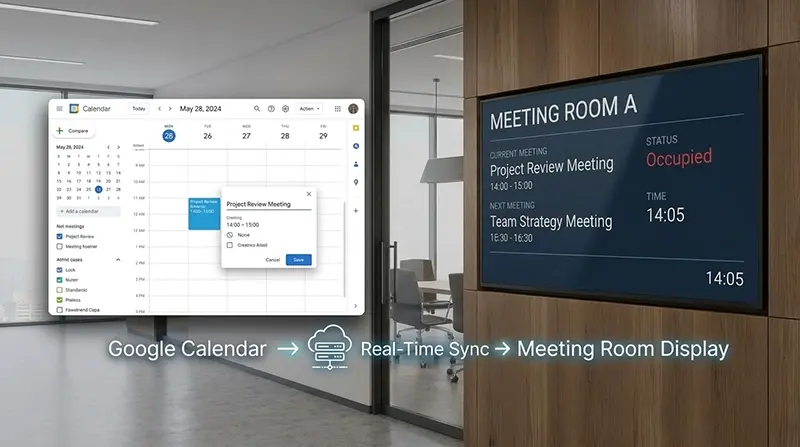
Display real-time meeting room availability, current meetings, and upcoming schedules automatically updated on every screen.

Google Calendar
Video Wall Control
Design and deploy content for any video wall size using a layout editor that mirrors your physical setup.
◉ Flexible Layouts: Design and preview content on a canvas matching any multi-screen or large-scale setup.
◉ Canvas-Based Design: Design content directly on a canvas matching your real-world arrangement for accurate placement.
◉ Bezel Correction: Compensate for display bezels to deliver a seamless viewing experience.
◉ WYSIWYG Preview: Inspect content exactly as it will look on your displays before publishing.
Interactive Events
Deliver engaging and automated digital signage experiences through real-time triggers from users, sensors, and connected devices.
◉ Hardware & IoT Triggers: Trigger content via touch screens, sensors, RFID, Serial, and MQTT devices.
◉ Interactive Discovery: Engage audiences with 'Lift & Learn' and 'Touch & Learn' product experiences.
◉ Automated Playback & Continuity: Run scheduled or event-driven content seamlessly while preserving your main playlist flow.
Playlist & Schedule Management
Organize media sequences, schedule automated playtimes, and create engaging playback flows with ease.
◉ Drag & Drop Playlists: Easily organize and sequence media using an intuitive drag-and-drop interface.
◉ Interactive Playback: Boost engagement with smooth transitions and event-driven triggers.
◉ Calendar Scheduling: Drag and drop content to set playback times and automate display power-off schedules.
Real-Time Order Integration & Menu Management
Real-time synchronization that delivers instant order and menu updates across all in-store displays.
◉ Live Order Status: Display mobile order details and live statuses in real time to streamline staff workflow and customer pickup.
◉ Live Menu Manager: Push instant menu and pricing updates from the web dashboard to all connected digital boards without manual replacement.
Audience Analytics
Gain real-time customer insights and deliver targeted screen experiences using smart camera analytics.
◉ Real-Time Visitor Analytics: Analyze visitor demographics (age groups and gender) and traffic trends by time and day to support data-driven store strategies.
◉ Personalized Content Delivery: Trigger real-time, tailored content—such as welcome messages, promotions, and coupons—based on face detection.

Efficient Group Management
Organize and manage users, content, and devices by department, region, or project to streamline team collaboration.
◉ Group Organization: Structure and manage devices, media, and teams by department, region, or project.
◉ Role-Based Permissions: Add unlimited users and assign custom permissions for secure, collaborative workflows.


Products
Use Cases